Introduction to Log Data Transfer in VCF Operations 9
With the release of VMware Cloud Foundation (VCF) 9, Logs is now more integrated into Operations. Moving from Aria Operations for Logs 8.18.x to VCF 9 does not support a direct, in-place upgrade, instead, administrators must perform a fresh deployment of the 9.0 appliance. This deployment shift creates an immediate challenge: how do you maintain your audit trails and troubleshooting history without keeping the legacy appliance running forever?
This is where the native Log Data Transfer functionality comes in. It is a built-in migration tool accessible via the VCF Operations control panel that safely pulls your historical log data from the legacy environment into your new VCF 9 instance.
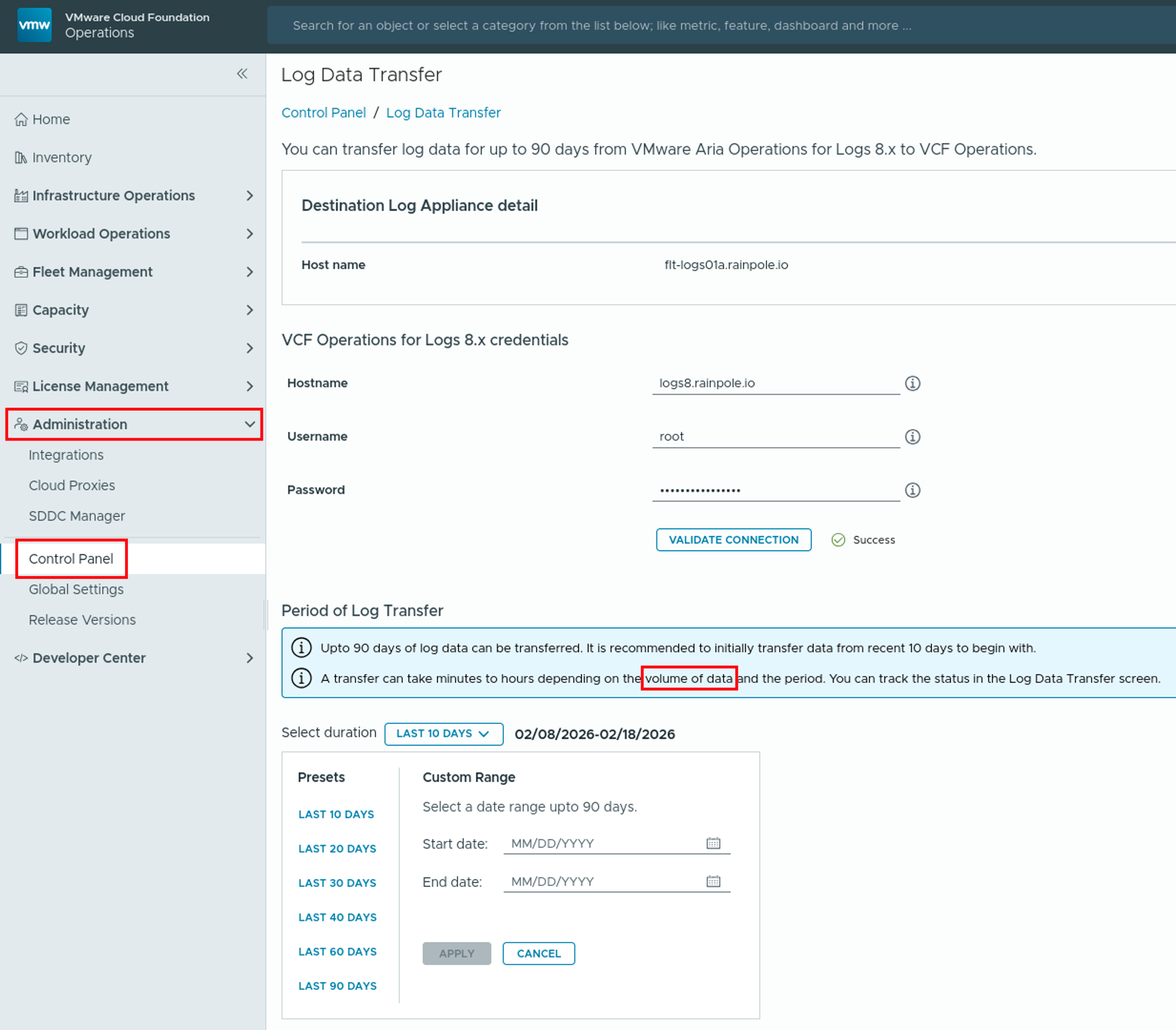
While it is incredibly useful for maintaining recent visibility, it does have a strict limitation: it will only migrate a maximum of the last 90 days of log data. If you are looking for a comprehensive guide on how to migrate not just the raw logs, but also your content and configuration elements, be sure to check out my previous post: Migrating Content and Config from Aria Operations for Logs 8.18 to VCF Operations for Logs 9.
Requirements and Limitations
Before initiating the transfer, it is critical to prepare your environment and understand the boundaries of this feature. This functionality is purpose-built strictly for historical data migration, and treating it as a magic bullet for your entire configuration can lead to operational gaps.
Requirements:
- Adequate Storage: Your new VCF 9 logging nodes must have sufficient provisioned disk space to ingest and index the incoming historical data.
- Parallel Execution: Both your legacy Aria Operations for Logs 8.18.x cluster and the newly deployed VCF Operations 9 instance must be powered on, running, and able to communicate over the network during the entire transfer process.
- Target Readiness: The new VCF Operations 9.0 must be fully deployed, properly licensed via the VCF Operations interface, and actively integrated.
Limitations:
- Not a Substitute for Live Forwarding: The transfer is a one-time pull of historical data. It does not handle new, incoming logs. You must still manually re-point your log sources (vCenter, ESXi hosts, NSX, etc.) or configure real-time CFAPI log forwarding to the new 9.0 appliance to capture live traffic.
- The 90-Day Hard Limit: The tool is hardcoded to transfer maximally the most recent 90 days of log data. If your organization requires longer retention for compliance (e.g., 1 or 3 years), you will need to keep the 8.18.x appliance online as a cold archive or export those older logs to an NFS mount.
Estimating Storage and the “Sealed Bucket” Constraint
One of the most common questions when preparing for a log migration is: How much space do I actually need on the target VCF Operations 9 appliance? Additionally, understanding exactly which logs will transfer requires a quick look under the hood at how the system writes data.
Getting a Rough Estimate via the UI You can get a rough approximation of the required storage space by looking at your daily ingestion rates in the legacy UI:
- Log into your legacy Aria Operations for Logs 8.18.x interface.
- Navigate to Administration > System Monitor > Statistics.
- Look for your average daily ingestion rate (measured in GB/day).
- Multiply this daily rate by the number of days you intend to transfer (up to the 90-day maximum).
While this gives you a ballpark figure, it is not highly accurate because ingestion rates fluctuate, and it doesn’t account for the exact internal file structure the migration tool relies on.
The “Sealed Bucket” Constraint
As you select your timeframe, there is a critical technical constraint you must be aware of: the transfer tool will only migrate sealed buckets.
In the Aria Operations for Logs architecture, incoming log messages are written into internal files known as “buckets.” A bucket remains open and is actively written to until it reaches its maximum size. Once it hits this limit, the bucket is “sealed” and queued for archiving. Because the native migration tool pulls these completed files, any logs residing in the currently active, unsealed bucket will be left behind during the transfer.
To manually check the exact timestamps and statuses of these buckets to see what will actually migrate, you have to use the internal index tool from the command line of your legacy appliance: /usr/lib/loginsight/application/sbin/bucket-index show
Running this command dumps the internal state of all buckets, allowing you to manually cross-reference the sealed status against your desired timeframes. However, parsing this raw output by hand to calculate your exact storage requirements is tedious and error-prone.
The Solution: Automated Storage and Bucket Calculation Script
To eliminate the guesswork and manual calculation, I have created a custom Python script that does the heavy lifting for you.
Instead of relying on rough UI estimates or manually digging through raw command-line outputs, this script runs directly on your source vRLI (Aria Operations for Logs) appliance. It programmatically executes the /usr/lib/loginsight/application/sbin/bucket-index show command, parses the output, and instantly calculates exactly what you need to know.
What the script does:
- Compact Timeframe Visibility: It translates the raw bucket data into an easy-to-read, compact format, clearly showing the timestamps of the sealed buckets so you know exactly which historical logs will be transferred and where the cutoff is.
- Accurate Storage Calculation: It analyzes the exact size of the sealed buckets within your specified timeframe, giving you the precise storage footprint required on your target VCF Operations 9 instance.
You can download the script from my GitHub repository here: bucket-tool.py
How to Use the Script:
- Transfer the Script: First, download the script and transfer it to your Aria Operations for Logs 8.18.x node or nodes, as you need to check the buckets on every node. You can do this easily using an SCP client (like WinSCP) or by pulling it directly if your appliance has outbound internet access.
- Execute the Script: SSH into your node or nodes as
rootand navigate to the directory where you placed the script. You can run it directly using the built-in Python environment.
Run the script using the following syntax:
bucket-tool.py [-h] {archived-size,list-active,list-archived}
The -h option will show you detailed information.
root@logs8 [ ~ ]# ./bucket-tool.py -h
usage: bucket-tool.py [-h] {archived-size,list-active,list-archived} ...

VMware Aria Operations for Logs / vRealize Log Insight Bucket Tool

This script queries the local bucket-index and calculates sizes
for both active and archived data buckets.

options:
  -h, --help            show this help message and exit

Commands:
  {archived-size,list-active,list-archived}
    archived-size       Calculate the total size of archived buckets within a specific date range.
    list-active         List all currently active buckets along with start times and sizes.
    list-archived       List archived buckets chronologically and calculate total size.

EXAMPLE USAGE:
-------------------
1. Calculate archived buckets within a specific date range:
   ./bucket-tool.py archived-size 11.02.2026-00:00:00 16.02.2026-23:59:59

2. List all currently active buckets and their sizes:
   ./bucket-tool.py list-active

3. List all archived buckets chronologically and calculate grand total:
   ./bucket-tool.py list-archived

4. List archived buckets from the last N days (calculated from newest bucket):
   ./bucket-tool.py list-archived -days 7
Example 1: Calculating size using the --days option:
root@logs8 [ ~ ]# ./bucket-tool.py list-archived -days 2

--- Archived Buckets (Last 2 Days from Newest Bucket) ---
Found 22 matching archived bucket(s).

BUCKET ID                                | START TIME          | END TIME            | SIZE
--------------------------------------------------------------------------------------------------------------
215103d0-b4da-4731-aa50-692a565034da     | 17.02.2026-05:12:30 | 17.02.2026-10:06:31 | 527839737 bytes (503.39 MB)
8af27582-56b6-43f4-b511-4d5d20616e2a     | 17.02.2026-05:26:30 | 17.02.2026-10:20:59 | 484560868 bytes (462.11 MB)
a671e891-8e8c-42e1-b341-2c172d03654f     | 17.02.2026-10:06:31 | 17.02.2026-14:59:24 | 488924638 bytes (466.27 MB)
223ce6c5-54bf-40b3-aee8-0a81a4c362b0     | 17.02.2026-10:20:28 | 17.02.2026-15:16:29 | 483295489 bytes (460.91 MB)
14866db9-2c84-41ae-8a24-40d06c60eb36     | 17.02.2026-14:58:25 | 17.02.2026-19:46:51 | 561683260 bytes (535.66 MB)
1e582f93-f7ac-48f1-a061-0b9aa68b68e0     | 17.02.2026-15:15:21 | 17.02.2026-20:03:24 | 518751865 bytes (494.72 MB)
d6afd25e-678a-4c27-86f0-f19cdea2d8ee     | 17.02.2026-19:46:52 | 18.02.2026-00:40:11 | 483374108 bytes (460.98 MB)
b66e9944-3611-4ace-8543-3ce5ada2a613     | 17.02.2026-20:02:23 | 18.02.2026-00:36:54 | 504796066 bytes (481.41 MB)
097fa332-ce6f-4638-852a-c9cd88d1ba13     | 18.02.2026-00:36:55 | 18.02.2026-05:26:59 | 497486242 bytes (474.44 MB)
cc84a00e-f2b1-412f-b012-9a718510eca8     | 18.02.2026-00:38:32 | 18.02.2026-05:31:12 | 484094756 bytes (461.67 MB)
ced5a7a4-26c3-4b3a-a7cb-2784aab1c734     | 18.02.2026-05:26:51 | 18.02.2026-10:19:59 | 496026695 bytes (473.05 MB)
fbe1340c-fbaf-4352-8cfa-0ff0a29fad25     | 18.02.2026-05:30:29 | 18.02.2026-10:19:27 | 483410681 bytes (461.02 MB)
09f7f631-84c0-443e-a548-d779321483da     | 18.02.2026-10:18:35 | 18.02.2026-14:22:37 | 487296852 bytes (464.72 MB)
26271aa9-0636-435a-b810-2ea25386c7ff     | 18.02.2026-10:18:41 | 18.02.2026-15:10:11 | 484331482 bytes (461.89 MB)
d6ee12e8-09e7-4b36-b97c-830a1fcb6f33     | 18.02.2026-14:22:37 | 18.02.2026-19:04:15 | 488814160 bytes (466.17 MB)
e2af5662-61b5-4356-8ade-97e8ff58d8e8     | 18.02.2026-15:08:27 | 18.02.2026-19:49:46 | 483636171 bytes (461.23 MB)
1c4bfc67-13fd-4316-a835-35198ec3f4c3     | 18.02.2026-19:02:44 | 18.02.2026-23:51:23 | 488651400 bytes (466.01 MB)
e744569f-0baf-4b96-bc78-7096a85bb6f9     | 18.02.2026-19:48:27 | 19.02.2026-00:40:48 | 484722906 bytes (462.27 MB)
4c0b230f-d57a-4619-8389-993fbf772ee2     | 18.02.2026-23:50:05 | 19.02.2026-04:14:08 | 502770493 bytes (479.48 MB)
4d1f52a6-af4a-43c3-a978-2e874a319042     | 19.02.2026-00:40:47 | 19.02.2026-05:21:08 | 487668699 bytes (465.08 MB)
5208d8f1-da03-44fe-952b-1d8fbd0cef62     | 19.02.2026-04:12:32 | 19.02.2026-09:05:44 | 483531212 bytes (461.13 MB)
c141ee99-41e0-4e32-815c-58233f530edd     | 19.02.2026-05:20:35 | 19.02.2026-10:04:45 | 485208688 bytes (462.73 MB)
--------------------------------------------------------------------------------------------------------------

Grand Total Size: 10890876468 bytes (10.14 GB)
Example 2: Calculating size using a specific start and end date:
root@logs8 [ ~ ]# ./bucket-tool.py archived-size 11.02.2026-00:00:00 14.02.2026-23:59:59

--- Archived Buckets Summary (Date Range) ---
Found 2 archived bucket(s) overlapping the timeframe.

Matched Bucket IDs:
 - b5960955-830e-485c-9e3e-6475c8312015
 - c267b3dd-f556-4562-991b-3ae1d523e87b

Total size: 1084598227 bytes (1.01 GB)
Example 3: Showing an overview of all archived buckets:
root@logs8 [ ~ ]# ./bucket-tool.py list-archived

--- All Archived Buckets ---
Found 31 matching archived bucket(s).

BUCKET ID                                | START TIME          | END TIME            | SIZE
--------------------------------------------------------------------------------------------------------------
b5960955-830e-485c-9e3e-6475c8312015     | 11.02.2026-12:00:23 | 16.02.2026-15:03:11 | 557899947 bytes (532.05 MB)
c267b3dd-f556-4562-991b-3ae1d523e87b     | 11.02.2026-12:02:12 | 16.02.2026-14:57:36 | 526698280 bytes (502.30 MB)
87df705e-14ac-4c8d-9192-29b4d01da190     | 16.02.2026-14:57:33 | 16.02.2026-19:43:18 | 494059776 bytes (471.17 MB)
5a9a761c-3f5f-4b2b-bfc0-df5fcd11f46a     | 16.02.2026-15:02:28 | 16.02.2026-19:49:18 | 524298036 bytes (500.01 MB)
1f308466-4206-43b7-bdff-b42b566eb266     | 16.02.2026-19:42:26 | 17.02.2026-00:26:59 | 484174133 bytes (461.74 MB)
e703b116-ed16-4f46-ba24-f75877238cbb     | 16.02.2026-19:48:26 | 17.02.2026-00:41:10 | 483224281 bytes (460.84 MB)
817a27b1-8639-42ed-9332-8b0882a3eaff     | 17.02.2026-00:26:24 | 17.02.2026-05:13:59 | 493839392 bytes (470.96 MB)
8c3f8ce7-3ce2-406b-978d-e289228251f7     | 17.02.2026-00:40:22 | 17.02.2026-05:26:29 | 531625077 bytes (507.00 MB)
215103d0-b4da-4731-aa50-692a565034da     | 17.02.2026-05:12:30 | 17.02.2026-10:06:31 | 527839737 bytes (503.39 MB)
8af27582-56b6-43f4-b511-4d5d20616e2a     | 17.02.2026-05:26:30 | 17.02.2026-10:20:59 | 484560868 bytes (462.11 MB)
a671e891-8e8c-42e1-b341-2c172d03654f     | 17.02.2026-10:06:31 | 17.02.2026-14:59:24 | 488924638 bytes (466.27 MB)
223ce6c5-54bf-40b3-aee8-0a81a4c362b0     | 17.02.2026-10:20:28 | 17.02.2026-15:16:29 | 483295489 bytes (460.91 MB)
14866db9-2c84-41ae-8a24-40d06c60eb36     | 17.02.2026-14:58:25 | 17.02.2026-19:46:51 | 561683260 bytes (535.66 MB)
1e582f93-f7ac-48f1-a061-0b9aa68b68e0     | 17.02.2026-15:15:21 | 17.02.2026-20:03:24 | 518751865 bytes (494.72 MB)
d6afd25e-678a-4c27-86f0-f19cdea2d8ee     | 17.02.2026-19:46:52 | 18.02.2026-00:40:11 | 483374108 bytes (460.98 MB)
b66e9944-3611-4ace-8543-3ce5ada2a613     | 17.02.2026-20:02:23 | 18.02.2026-00:36:54 | 504796066 bytes (481.41 MB)
097fa332-ce6f-4638-852a-c9cd88d1ba13     | 18.02.2026-00:36:55 | 18.02.2026-05:26:59 | 497486242 bytes (474.44 MB)
cc84a00e-f2b1-412f-b012-9a718510eca8     | 18.02.2026-00:38:32 | 18.02.2026-05:31:12 | 484094756 bytes (461.67 MB)
ced5a7a4-26c3-4b3a-a7cb-2784aab1c734     | 18.02.2026-05:26:51 | 18.02.2026-10:19:59 | 496026695 bytes (473.05 MB)
fbe1340c-fbaf-4352-8cfa-0ff0a29fad25     | 18.02.2026-05:30:29 | 18.02.2026-10:19:27 | 483410681 bytes (461.02 MB)
09f7f631-84c0-443e-a548-d779321483da     | 18.02.2026-10:18:35 | 18.02.2026-14:22:37 | 487296852 bytes (464.72 MB)
26271aa9-0636-435a-b810-2ea25386c7ff     | 18.02.2026-10:18:41 | 18.02.2026-15:10:11 | 484331482 bytes (461.89 MB)
d6ee12e8-09e7-4b36-b97c-830a1fcb6f33     | 18.02.2026-14:22:37 | 18.02.2026-19:04:15 | 488814160 bytes (466.17 MB)
e2af5662-61b5-4356-8ade-97e8ff58d8e8     | 18.02.2026-15:08:27 | 18.02.2026-19:49:46 | 483636171 bytes (461.23 MB)
1c4bfc67-13fd-4316-a835-35198ec3f4c3     | 18.02.2026-19:02:44 | 18.02.2026-23:51:23 | 488651400 bytes (466.01 MB)
e744569f-0baf-4b96-bc78-7096a85bb6f9     | 18.02.2026-19:48:27 | 19.02.2026-00:40:48 | 484722906 bytes (462.27 MB)
4c0b230f-d57a-4619-8389-993fbf772ee2     | 18.02.2026-23:50:05 | 19.02.2026-04:14:08 | 502770493 bytes (479.48 MB)
4d1f52a6-af4a-43c3-a978-2e874a319042     | 19.02.2026-00:40:47 | 19.02.2026-05:21:08 | 487668699 bytes (465.08 MB)
5208d8f1-da03-44fe-952b-1d8fbd0cef62     | 19.02.2026-04:12:32 | 19.02.2026-09:05:44 | 483531212 bytes (461.13 MB)
c141ee99-41e0-4e32-815c-58233f530edd     | 19.02.2026-05:20:35 | 19.02.2026-10:04:45 | 485208688 bytes (462.73 MB)
e2293abf-527c-45f6-8829-5fa423ed5423     | 19.02.2026-09:05:08 | 19.02.2026-13:46:34 | 484232522 bytes (461.80 MB)
--------------------------------------------------------------------------------------------------------------

Grand Total Size: 15470927912 bytes (14.41 GB)
Interpreting the Results
Looking at the outputs above, you can clearly see the earliest and latest sealed bucket timestamps that fall into your migration window. The script also provides the exact total size of these buckets.
When you navigate to the VCF Operations 9 UI to begin the Log Data Transfer, you can confidently set your transfer timeframe knowing exactly which logs will make the jump and knowing that you have provisioned the precise amount of storage required on your target /storage/core partition to accommodate them.
Stay safe and happy labbing.
Thomas